Enabling GodMode In Windows with Complete Features

What is GodMode?

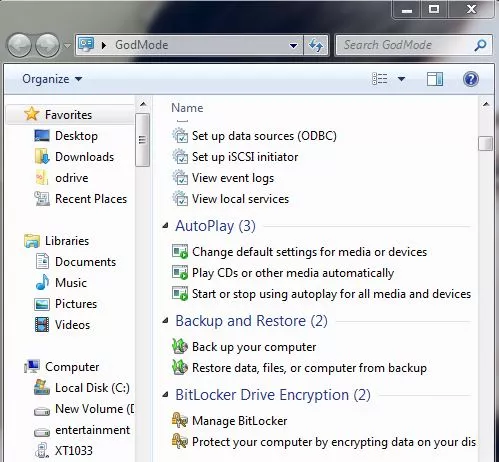
Windows GodMode is an old trick, but I thought it’d be nice to share it with our readers who don’t know about it as Windows 10 is released. Also, I’ll be telling about all GodMode folders here, not just a single one. Windows GodMode, as the name suggests, provides you a shortcut and grander access to various control panel settings. It is also known as the Windows Master Control Panel shortcut (All Tasks) or All Tasks folder by different people.

By making this GodMode folder, you’ll get access to all the settings of the control panel in your OS within a single folder. This hack was first revealed in 2007 and it works in operating systems higher than Windows Vista i.e Window 7, Window 8, Windows 8.1, and Windows 10.
As you’ll know how to do it, you’ll come across the step of renaming the folder and using the phrase “GodMode”. Actually, GodMode name has nothing to do with this trick. Use your name instead of GodMode and it’ll work just fine because GodMode is just a name given to this trick as it got popular.

How To Enable GodMode?
 Create a new folder in Windows
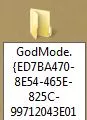
god-mode-1Rename it to: GodMode.{ED7BA470-8E54-465E-825C-99712043E01C
godmode
Once renamed it’ll converted and looks like control panel icon, open and there you have it.
god-mode-enable
godmode-enabledNote: You can enable GodMode using this trick in Windows Vista Window 7, Window 8, Windows 8.1,and Windows 10.


How to enable all GodMode folders?

There’s a lot more to this GodMode trick. There are a lot more GodMode folders waiting for you to utilize them. Copy and paste the script written below in a new notepad file. Rename this file as “godmodes.bat” and paste at the location where you want these GodMode folders to be. Now click on the renamed file “godmodes.bat” and there you have a list of GodMode folders, all with different uses.

Comments

Popular posts from this blog

Working Dark Web links in 2021

.Onion v2 will be deprecated in October 2021. v3 .onion sites will be formally launched. Yet, if you are wondering what's all about .onion, download Tor Browser and install to your computer. Tor will connects you to the deep web often called "hidden sites" and some calls it "dark web". Note: Never open the links if you do not have information about .onion sites.  FAQ What are .onion links?   onion links are only accessible via the Tor Network, commonly known as the "dark web"   How do I access .onion links?   you need the Tor Browser, which is a modified version of Firefox that routes any traffic through the Tor Network   Is accessing the Tor Network/Dark Web illegal?   a quick search in your prefered search engine will give you the answer  How do I stay safe while browsing the dark web?   only use the Tor Browser on a Unix based OS (macOS/OSX and Linux (any distro/flavor will do)) and have a VPN that does not ...

Best guidelines for designing a modern projects with embedded systems

Engineers, physicists, and programmers share a common thread in their dedication to the realms of calculations, computations and risk analysis. This post offers insights that can greatly enhance your creativity and proficiency. I am presenting a condensed approach to designing a contemporary system utilizing embedded systems electronics. Here, you can adhere to the instructions outlined in the list. Fundamental guidelines for crafting a unique DAC-ADC System in automation and IoT projects: 1. Creative Ideation: Commence with innovative ideation, fostering a distinct vision for the DAC-ADC system’s unique attributes and functionalities. 2. Strategic Market Planning: Undertake comprehensive market planning, encompassing market research, competitive analysis, and identification of market demands. 3. Research Study Compilation: Develop a meticulously researched study, delineating technical prerequisites, market dynamics, and potential applications. 4. Systematic Data Acquisition: Execute a...

LET Grading System: Elementary and Secondary Levels Explained with Examples

The Licensure Examination for Teachers (LET) is an important examination that aspiring teachers must take in order to obtain their teaching license in the Philippines. In this tutorial, we will explore the grading system for the LET, specifically for the Elementary Level and Secondary Level where "x" is the candidate's average each category such as general education and professional education. Elementary Level: General Education: 60% * x  Professional Education: 40% * x Example: If a candidate scores 80 in General Education and 90 in Professional Education, the calculation would be as follows: General Education score = 80 * 0.6 = 48 Professional Education score = 90 * 0.4 = 36 Final Score = 48 + 36 = 84 Secondary Level: General Education: 20% * x  Professional Education: 40% * x  Major: 40% * x  Example: If a candidate scores 75 in General Education, 85 in Professional Education, and 80 in Major, the calculation would be as follows: General Education score = 75 * 0.2...